
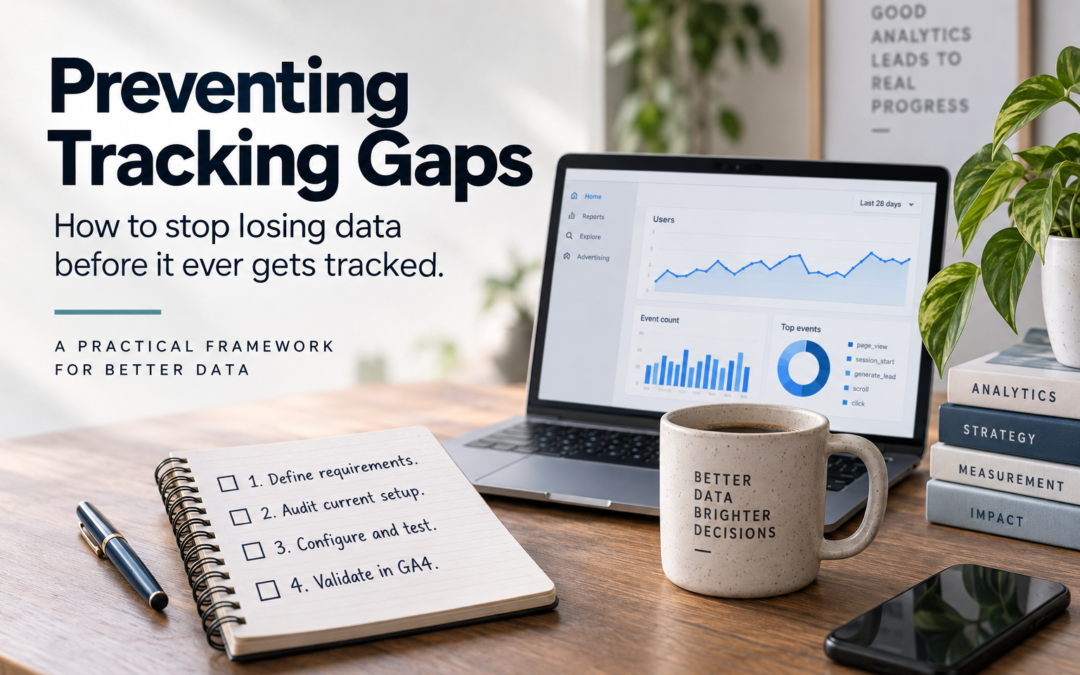
A practical GA4/GTM implementation framework to make sure measurement requirements survive the trip from “we need to know this” to usable data.
Tracking gaps rarely begin inside GA4.
They usually begin earlier: a new form launches without analytics requirements, a developer changes a component nobody knew contained a trigger, a stakeholder assumes something is already measured, or a tag is tested at launch but nobody checks whether the resulting data actually arrives correctly.
That distinction matters because tracking implementation and data validation are not the same thing.
The framework in the poster creates a simple control loop:
Define → Audit → Configure/Test → Validate
The first three steps help you ship the right implementation. The fourth catches the failures that only become visible after data collection begins.
Why GA4 tracking gaps happen
A tracking gap is any difference between the user behavior the organization believes it is measuring and the data actually being collected.
Sometimes the gap is obvious: no event fires at all. The more dangerous gaps are subtler:
- An event fires twice.
- The event name is correct but a critical parameter is missing.
- A form submission fires on button click rather than successful submission.
- A new CTA uses different markup and bypasses an existing GTM trigger.
generate_leadfires, but the parameter needed to distinguish lead types does not.- A developer changes a data-layer value.
- An event works in staging but not production.
- Consent behavior prevents collection in situations nobody tested.
- The data reaches GA4, but not in the shape analysts expected.
- Everyone assumes someone else checked production.
Google itself distinguishes between data that hasn’t finished processing and data that simply wasn’t supplied. For example, (data not available) can be caused by processing, whereas (not set) commonly indicates that Analytics did not receive a value for the dimension.
That is why a good measurement process needs controls before, during, and after implementation.
The Tracking Gap Prevention Framework
1. Define web tracking requirements
Owner: Stakeholder + Analyst
Get clear direction on what actually needs to be tracked.
Don’t begin with:
“What events should we add?”
Begin with:
“What question are we trying to answer?”
The analyst’s job is to translate a business question into a measurement requirement.
For example:
Business question
Are visitors using the mortgage calculator and then requesting information?
That might translate into:
| Requirement | Definition |
|---|---|
| Business question | Does calculator usage contribute to leads? |
| User behavior | Completes mortgage calculation |
| GA4 event | calculator_complete |
| Parameters | calculator_type, loan_type, result_range |
| Downstream outcome | generate_lead |
| Reporting need | Calculator users → lead rate |
| QA expectation | One event per completed calculation |
This prevents a common analytics failure: collecting data because it seems interesting rather than because someone needs it to make a decision.
Use Google’s analytics event taxonomy before inventing your own
GA4 automatically collects some events and provides recommended events for additional behaviors. Google recommends implementing these predefined events when they fit the behavior because they support standardized reporting and integrations.
So your event-design hierarchy should generally be:
Automatically collected → Enhanced measurement → Recommended event → Custom event
Don’t create form_successful_submit_v2 when an existing GA4 event and parameters adequately describe the behavior.
Your definition-of-ready checklist
Before implementation begins, you should be able to answer:
- What business question does this measurement answer?
- What exact user action triggers it?
- What event should fire?
- What parameters should accompany it?
- What values are allowed?
- On which pages/components does it apply?
- Are there exclusions?
- What should happen under consent restrictions?
- How will QA determine that it worked?
- Where will the resulting data ultimately be used?
If those aren’t clear, the tracking request isn’t ready for implementation.
2. Audit the current analytics setup
Owner: Analyst
Verify what’s already tracked, flag what’s net-new.
This step sounds mundane, but it prevents analytics debt.
Before creating anything, determine what already happens.
For a new feature, inspect:
Website → data layer → GTM → GA4 → reporting
Don’t audit only GA4.
For example, suppose someone asks:
“Can we add tracking to the Apply Now buttons?”
You discover that there is already a generic CTA event:
cta_click
with:
cta_textcta_urlcta_location
You may not need another event at all.
Without the audit, someone might introduce:
apply_click
Then another team creates:
application_button_click
Six months later, analysts have three definitions of effectively the same behavior.
What to document
A lightweight tracking inventory can be enough:
| Element | Existing? | Event | Parameters | Change needed |
|---|---|---|---|---|
| CTA click | Yes | cta_click | text, URL, location | None |
| Form start | No | — | — | New |
| Form submit | Yes | generate_lead | form_name | Add lead_type |
| Calculator | No | — | — | New |
Now you know precisely what the implementation ticket needs to change.
Audit the behavior, not just the configuration
Open the actual experience.
Click things.
Submit forms.
Trigger errors.
Navigate backward.
Use different paths through the experience.
Analytics specifications often describe the ideal user journey, while real users interact with interfaces in messier ways.
That’s where duplicate and misleading events hide.
3. Configure and test web analytics tags
Owner: Analyst + Developer
Set it up in GTM/GA4, test thoroughly, then publish.
This is where the measurement specification becomes executable.
Depending on the architecture, responsibility may be split among the analyst, analytics engineer and developer.
A common implementation flow is:
Application → data layer → GTM trigger → GA4 event
The important principle is that testing should happen before publishing, not afterward.
Google Tag Manager’s Preview mode is specifically designed for this. It lets you interact with the site as though the current workspace were deployed and inspect which tags fired, what triggered them, and what data was passed.
Google’s publishing documentation similarly instructs implementers to verify tag behavior before publishing the container.
Don’t test only “did the tag fire?”
That’s necessary, but insufficient.
A useful QA matrix looks more like this:
| Test | Expected result |
|---|---|
| Correct interaction | Event fires once |
| Wrong interaction | Event does not fire |
| Required parameters | All populated |
| Parameter values | Match specification |
| Repeated interaction | Expected repeat behavior |
| Page navigation | No accidental event |
| Form validation failure | No successful-submit event |
| Successful submission | Correct event fires |
| Mobile interaction | Same expected behavior |
| Consent states | Expected behavior for each state |
The negative tests are particularly valuable.
Don’t only ask:
“Can I make this event fire?”
Also ask:
“Can I make it fire when it shouldn’t?”
That catches a surprising number of implementation problems.
Test the payload
If your specification says:
generate_lead
with:
form_name = mortgage_consultationlead_type = mortgage
don’t declare success because Tag Assistant displays generate_lead.
Confirm the parameters too.
Otherwise you’ve verified transportation but not the cargo.
Keep GTM changes auditable
Use descriptive container-version names and descriptions.
Instead of:
Updated tags
use something like:
Mortgage calculator tracking — calculator_complete + lead parameters — JIRA-1842
GTM supports versions and activity history as part of its publishing workflow.
That becomes extremely valuable months later when someone asks:
“When did this change?”
4. Validate in GA4
Owner: Analyst
Confirm data is flowing as expected, troubleshoot as needed.
This is the step the poster deliberately emphasizes.
And it is fundamentally different from Step 3.
Testing asks:
Does my implementation appear to send the correct data?
Validation asks:
Did the production analytics system actually receive and process what we expected?
Those aren’t interchangeable.
Why you should not validate everything immediately
GA4 has multiple processing intervals.
Realtime data generally appears within minutes, while standard-property intraday processing can take roughly 2–6 hours. Google also notes that processing can take 24–48 hours and that report data may change during that period.
So a useful validation process has multiple checkpoints.
Immediately after release
Use Realtime/debugging tools to answer:
Is anything arriving?
Check that:
- the production implementation exists;
- expected events appear;
- obvious parameters are present;
- nothing is catastrophically broken.
Next business day
Now answer:
Does the data look structurally correct?
Check:
- event counts;
- expected parameters;
- unexpected
(not set)values; - obvious duplicates;
- impossible values;
- unexpectedly high/low volume;
- relevant dimensions.
After sufficient volume accumulates
Answer the more important question:
Does the data behave plausibly?
Compare it with something independent where possible.
Examples:
GA4 leads vs CRM leads
GA4 purchases vs ecommerce transactions
Form events vs backend submissions
GA4 page activity vs server/CDN data
These systems don’t necessarily need to match exactly. What matters is whether discrepancies are explainable and stable.
The calendar reminder is a control, not a convenience
The sticky note on the poster is arguably the most important part:
Put a calendar reminder here.
Why?
Because Step 3 provides psychological closure.
So make post-launch validation an explicit deliverable.
A simple implementation ticket could include:
Release date: September 10
Initial production check: September 10
GA4 validation: September 11
Volume validation: September 17
Owner: Analyst
Now validation isn’t something the analyst is supposed to remember, it’s part of the process
Define 3 gates for web analytics updates
For more mature teams, I’d turn the four-step framework into three formal quality gates.
Gate 1 — Measurement Ready
Before development:
Requirements defined ✓
Existing implementation audited ✓
Event taxonomy approved ✓
Parameters defined ✓
Acceptance criteria written ✓
No tracking development starts without this.
Gate 2 — Release Ready
Before publishing:
GTM Preview tested ✓
Correct events fire ✓
Incorrect interactions don’t fire ✓
Parameters validated ✓
Duplicate firing tested ✓
Consent behavior tested ✓
Production release documented ✓
Google explicitly provides GTM Preview/Tag Assistant for inspecting tag firing and debugging before publication.
Gate 3 — Data Validated
After deployment:
Production event observed ✓
Processed GA4 data checked ✓
Parameters populated ✓
Volumes plausible ✓
No unexpected duplicates ✓
Downstream reporting checked ✓
Ticket closed ✓
Only after Gate 3 should measurement work be considered complete.
Business-forward web analytics tracking
You don’t need a giant 60-column analytics spreadsheet.
For many organizations, this is enough:
| Field | Example |
|---|---|
| Business question | Are calculator users generating leads? |
| Interaction | User completes calculator |
| Event | calculator_complete |
| Trigger | Successful calculation |
| Parameters | calculator_type, result_range |
| Expected frequency | Once per calculation |
| Pages/components | Mortgage calculator |
| Exclusions | Validation errors |
| Implementation | GTM + data layer |
| QA owner | Analyst |
| Release date | Sept. 10 |
| Production validation | Sept. 11 |
| Status | Validated |
Add a final field that many tracking plans omit:
Evidence
That can contain the ticket, screenshot, QA result, query, or other proof showing that the implementation was validated.
What to do when web event validation fails
A failed validation doesn’t automatically mean “GTM is broken.”
Work backward through the pipeline.
GA4 report
↓
GA4 processing/configuration
↓
GA4 request
↓
GTM tag
↓
GTM trigger
↓
data layer / browser event
↓
application behavior
Find the first place where expected ≠ actual.
That dramatically narrows troubleshooting.
For example:
Nothing in GA4
Check whether the request was actually sent.
Request sent, parameter missing
Inspect GTM variables/data layer.
Tag fires twice
Inspect trigger conditions and application events.
Event exists but report dimension says (not set)
Determine whether the relevant parameter is actually being sent and whether the reporting configuration supports it. Google notes that (not set) generally indicates that Analytics did not receive information for that dimension.
Yesterday’s numbers seem incomplete
Don’t immediately “fix” tracking. Check processing status first. Standard GA4 intraday data commonly has a 2–6 hour processing interval, and Google warns that reporting data can continue changing while processing completes.
Special case: server-side and Measurement Protocol events
Server-generated GA4 events deserve additional QA because a successful HTTP request does not necessarily mean the event was valid.
Google specifically warns that the Measurement Protocol doesn’t return HTTP error codes merely because an event contains certain invalid or missing parameters. Google therefore provides a separate validation server and Event Builder for validating events before production.
For Measurement Protocol implementations, add another pre-launch check:
Payload → Validation server → Production endpoint → GA4 validation
Google recommends strict validation during development using ENFORCE_RECOMMENDATIONS; its documentation explains that the stricter mode can reject invalid parameter types, excess parameters and other violations that relaxed validation may tolerate.
Also be cautious about trying to “repair” old gaps after the fact. Measurement Protocol has timestamp and processing limitations for historical events; Google’s current documentation describes a 72-hour backdating window and notes additional timing considerations when events need to join with client-side activity.
That reinforces the central idea of this framework:
preventing missing data is substantially easier than reconstructing it later.
Build web analytics tracking into the product-development lifecycle
The framework becomes much more powerful when analytics isn’t a separate task added at the end.
Instead of:
Design → Develop → Launch → “Oh, do we need tracking?”
use:
Requirement
↓
Measurement requirement
↓
Design/development
↓
Analytics QA
↓
Release
↓
Production validation
This makes measurement part of the feature’s definition of done.
A product ticket for a new form shouldn’t be complete merely because:
Users can successfully submit the form.
It should also require:
Required analytics events and parameters have been implemented, tested and validated in production.
The web analytics data governance layer
Once an organization has dozens or hundreds of events, preventing gaps becomes a governance problem.
Maintain a central measurement registry containing at minimum:
Event name | Business definition | Trigger | Parameters | Owner | Implementation | Status | Last validated
This gives analysts somewhere to answer:
“What does this event mean?”
without reverse-engineering GTM.
It also creates the foundation for automated monitoring.
Move from validation to observability in your web data
The four-step process prevents individual implementation failures.
The next maturity level is detecting failures automatically.
For business-critical events, monitor things like:
Event disappears
generate_lead normally occurs every day and suddenly goes to zero.
Volume collapses
Typical daily volume: 800–1,000
Today: 143
Volume explodes
Typical: 900
Today: 4,800
Possible duplicate firing.
Parameter completeness falls
lead_type historically populated:
98.7%
Today:
61.4%
Unexpected values appear
Expected:
mortgageautopersonal
Suddenly:
undefined
Those checks can often be run against the GA4 BigQuery export or another analytics warehouse.
Now you’ve moved from:
“Did somebody remember to check GA4?”
to:
“The measurement system tells us when something looks wrong.”
A simple analytics measurement-health score
For important events, you can even quantify tracking quality.
For example:
Tracking Health Score =
- 30% event availability
- 25% parameter completeness
- 20% volume stability
- 15% taxonomy compliance
- 10% downstream reconciliation
An event with healthy volume but 40% missing parameters is no longer allowed to appear “fine.”
That opens up a much more useful analytics dashboard than another traffic report:
Measurement Health
| Event | Firing | Parameters | Volume | Validation | Health |
|---|---|---|---|---|---|
| generate_lead | ✓ | 99% | Normal | ✓ | 99 |
| form_start | ✓ | 97% | Normal | ✓ | 97 |
| calculator_complete | ✓ | 64% | Low | ⚠ | 68 |
| application_submit | ✕ | — | Zero | ✕ | 0 |
Now analytics teams aren’t merely reporting on the website.
They’re monitoring the instrumentation producing those reports.
The core principle
The framework can ultimately be reduced to four questions:
1. What should happen?
Define requirements.
2. What already happens?
Audit.
3. Does our implementation behave correctly?
Configure and test.
4. Did the data actually arrive correctly?
Validate.
Most tracking processes do some version of the first three.
The fourth closes the loop.
And that’s the difference between installing analytics and operating a trustworthy measurement system.
Recommended web analytics tracking resources
For teams implementing this framework, I’d keep these official references bookmarked: GA4 recommended events reference for choosing standardized events before inventing custom ones; GTM Preview and Debug documentation for pre-publication QA; Tag Assistant documentation for troubleshooting live tags; GA4 data freshness documentation for deciding when post-launch validation is meaningful; and Measurement Protocol validation guide for server-side implementations.
One final operational rule is worth putting directly into your Jira/Asana template:
A tracking ticket is not Done when the tag is published. It is Done when the resulting production data has been validated.
That one change would prevent a remarkable number of tracking gaps.
Recent Comments